12 November 2026 · Twitter Ban Service · 17 min read
How to remove address from Google: Search, Maps and old results
To remove address from Google, file a request in Results about you or Google's personal-info removal form, naming each URL that shows it. Google checks that the address is yours and that the page is not a government, educational or news source. Search Help says an approved result disappears from Search, while the source page stays online.
What does Google remove when your address shows up in a result?
Google removes its own listing of a page, never the page.
Google Search is an index: it stores copies of pages other people publish and shows links to them. A request to remove address from Google therefore acts on the link and its snippet. As of November 2026, Search Help's page on removing private info from Google Search lists your address, phone number or email among the personal details you can ask to have removed, and it states that Google can only remove things from its own results. The site that published the address keeps it until its owner deletes it.
Twitter Ban Service is a reporting service for X accounts that break the X Rules, and address cases reach it when a post on X is the page Google indexed. That is why this guide keeps the Google side apart from the source side. People phrase the question many ways (how do you remove your address from Google, how can I remove my address from Google Search, how do I get my address off Google) and every answer starts by finding which Google surface displays it.
How to remove address from Google: pick the surface first
Five surfaces cover nearly every case, and each has its own control. Working out how to get address removed from Google is mostly a matter of matching the row.
| Where the address shows | Google's route | What stays |
|---|---|---|
| A search result linking to someone else's page | Results about you, or the detailed removal request form | The page itself, and other search engines |
| A snippet showing an address the site already deleted | Refresh Outdated Content | Nothing, once Google recrawls |
| Your house in Street View | Report a problem, with a blur request | The image, blurred |
| A Business Profile you manage | Turn off Show business address to customers | Your service area |
| A post on X or another platform | That platform's report form first, Google second | Screenshots and copies elsewhere |
How do I remove my address from Google with Results about you?
Open Results about you, give Google the address to look for, then request removal of each result it finds.
Results about you is Google's monitoring and removal dashboard for personal contact info. Its help page, Find and remove personal info in Google Search results, notes that some features are still rolling out to users over 18 in certain markets, so the menu may be missing in your country. Where it exists, this is how to remove my address from Google results without a long form:
- In the Google app, tap your profile picture or initial and select Results about you. On the web, open the Results about you page and select Get started or Settings.
- Enter your name and the contact info to watch. The form accepts a nickname, a maiden name and multiple home addresses.
- Turn on notifications, by email or through the Google app, if you want an alert when a new match appears.
- Open the To review tab, select a result to expand it and choose Request to remove. Mark as reviewed dismisses a result you are content to leave.
- Follow each case under Removal requests, where the status reads In progress, Approved, Denied or Undone.
Google says the first notification arrives within a few hours of setup, and a confirmation email follows every request. Twitter Ban Service cannot file this step for anyone: the dashboard is tied to your own Google account.
How to remove home address from Google when you find the result yourself
You do not have to wait for the dashboard. Search your name with your home city or street. On the result that shows the address, select More to open the About this result panel, choose Remove result, then It shows my personal info and I don't want it there, then Contact Info, and finish the flow while signed in. For anyone asking how do I remove my home address from Google in the fewest steps, or how to remove my home address from Google from a phone, this is it. One request covers one URL, and Google's tip is to type the address exactly as the page displays it.
How do I remove my address from Google Search without the dashboard?
Use the detailed removal request form, which Search Help opens from the Start removal request button on its private-info page.
The form exists for cases Results about you does not handle. Google names four: you are not signed in, you are filing for someone else, the page sits behind a paywall and you found it yourself, or professional contact info was posted to harm you. You, or a representative, list the URLs of the pages showing the address, and Google reviews only those URLs. It may ask for screenshots so a reviewer can find the address on a crowded page. Most people who search how to remove my address from Google Search never see this form. If you came here looking for how to remove address from Google Search for a parent or a client, it is the right route, because Google warns that a request filed for another person from your own dashboard may be denied.
The same form takes doxxing reports. Google's policy covers a URL that shows personal info alongside explicit or implicit threats, or a significant amount of aggregated personal info with no legitimate purpose. Twitter Ban Service sees that pattern when an X thread stacks a name, a street and a workplace in one place. How to remove home address from Google Search in that situation is a two-track job: the Google form for the result, and an X report for the thread.
What changes after approval, and what stays on the publishing site?
An approved Google remove address request hides the result; the address remains on the page that published it.
Google describes two outcomes. Most of the time the URL stops appearing for any search query. Sometimes Google applies what it calls query-based removal: the URL disappears only from searches that contain your name, because the page also holds content valuable to the public or details belonging to other people. Either way, the Results about you help page is blunt that the info still exists on the source web page. Anyone holding the link can open it. So can every other search engine.
Requests get denied too. Google declines when the info is not yours, when you control the page yourself (your own blog or social profile), or when the page belongs to a government body, an educational institution or a newspaper. A denial arrives by email, with the reason shown in the dashboard. So how can I get my address removed from Google when the publisher is a county records office? Not through this route; the records office is the only place to ask. And how do you get your address removed from Google for good? Pair the Google request with a deletion at the source, which clears the result on a later crawl. That pairing is the whole of how to get my address removed from Google and keep it that way.
Undo exists, with a catch. If someone else had the same URL removed, your undo will not bring it back. Twitter Ban Service files reports on X only; Google and X each reach their own decision.
How to remove name and address from Google when both appear together
Enter both in Results about you, remove the results it finds, then opt out at each people-search site.
Name plus address is the combination people-search sites sell, and it is the pairing Google's dashboard was built to catch: monitoring matches your name against the contact info you entered. To remove name and address from Google, add every name variant you have used and each address, then work through the To review tab. Anyone typing how to remove my name and address from Google is describing that exact setup screen. A page that mixes your details with other people's may get a query-based removal, which means it vanishes for searches of your name and can still surface for a neighbor's.
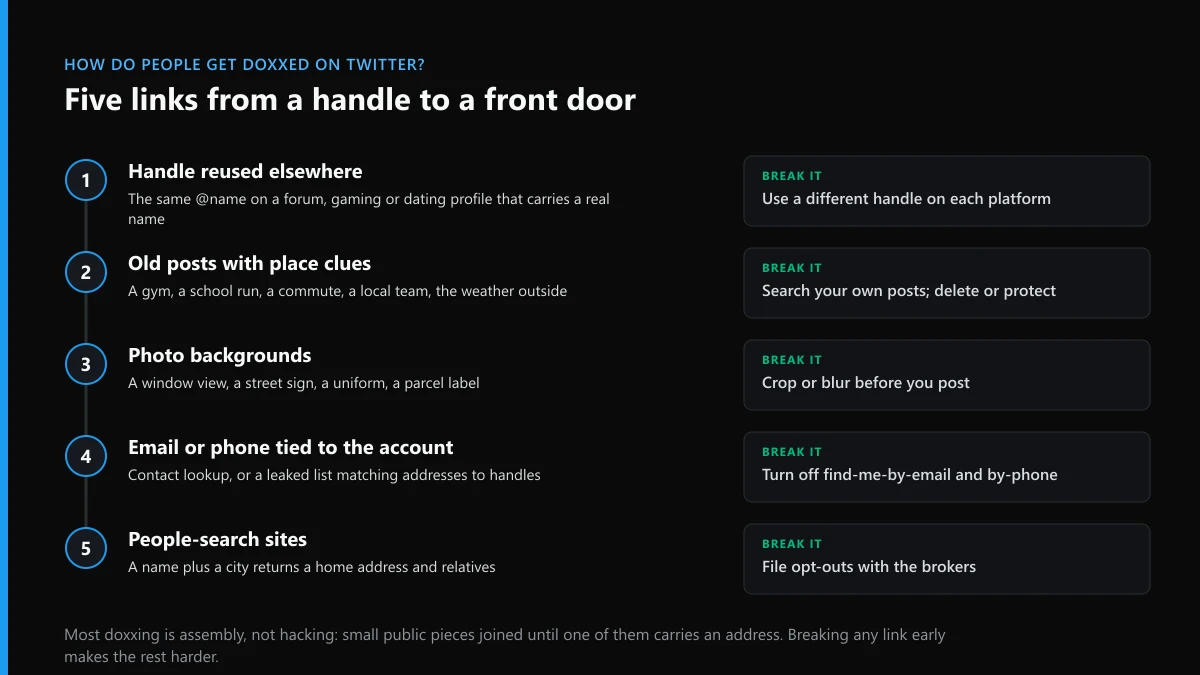
The listing regenerates if the broker keeps your record. Each people-search site runs its own opt-out, and the source-by-source order is laid out in the guide to getting an address off the wider internet. The X side is narrower: when the name-and-address pair was published on X to expose someone, that post is reportable under X's private information policy whatever Google decides.
How to remove old address from Google results and stale snippets
Request removal with the old address typed exactly as the page shows it, or refresh the result if the page has already changed.
An old address is still personal info. Google's tip covers it directly: if the result shows an old home address, enter the old home address in the form. That handles live pages. A different problem appears when the site has already deleted or corrected the address and Google's snippet still displays it. Privacy forms are the wrong tool there. The right one is Refresh Outdated Content, which asks Google to recrawl a URL and drop text that is no longer on the page; the outdated content removal tool walkthrough covers the request screen. To remove old address from Google the order is simple. Check the live page first. If the address is gone from it, refresh. If it is still there, file the privacy request and ask the site owner to delete it.
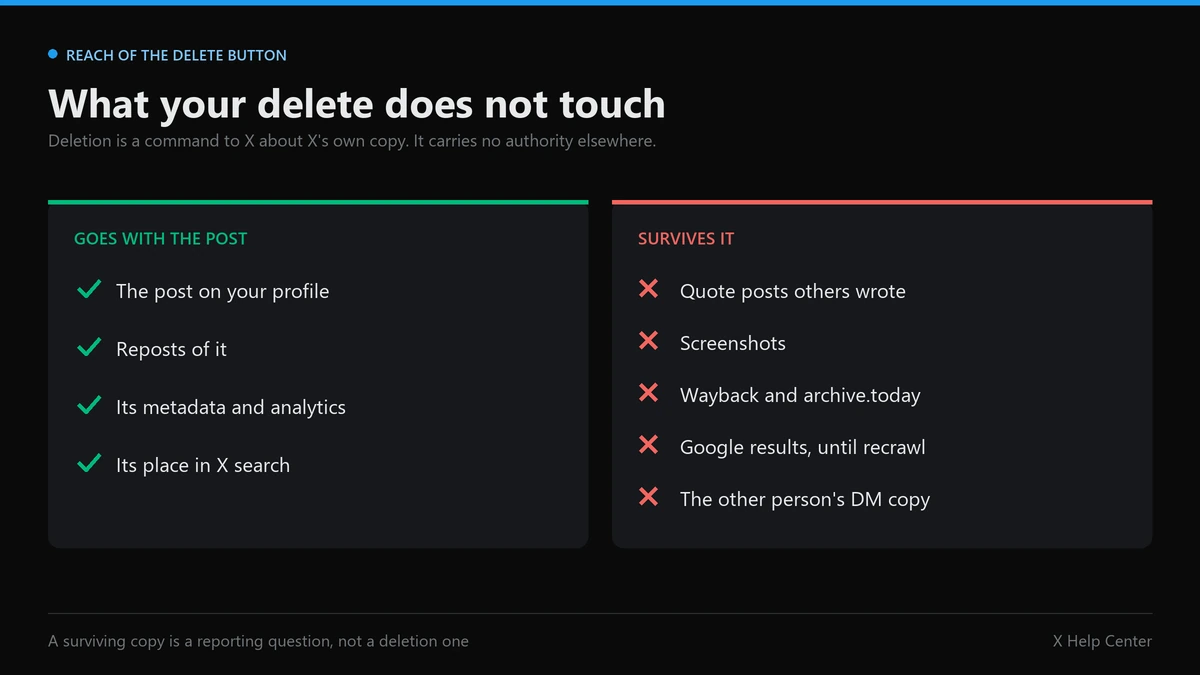
Deleted X posts behave the same way. When a post that carried an address comes down after a report, Twitter Ban Service tells the reporter to expect the Google result to linger until the next crawl and to refresh it by hand.
How to remove an address from Google Maps, Street View and a Business Profile
Maps has no privacy removal for a street address, but you can blur your home in Street View and hide the address on a profile you manage.
A residential address exists on the map as a place. That is geography, and Google does not delete it on request. What people usually mean by how to remove your home address from Google Maps is the photograph of the house, or a listing attached to the address.
Blurring a house in Street View
Google's Maps Help page Blur or remove 360 imagery says that when Google owns the photo, you can request a blur if it contains your face, home or other identifying information. Open the image in Google Maps, click Report a problem in the bottom right, complete the form and click Submit. Add your email if you want status updates. Per the same page, a blur that has been applied and published cannot be removed from that photo, so decide before you file; a later buyer or tenant inherits the choice.
Hiding the address on a Business Profile
Home-based businesses often publish their own address without meaning to. Business Profile Help's page Manage your business address states that the address on a profile is public. If customers never visit you, go to your Business Profile, select Edit profile, then Location, select Edit next to Business location, turn off Show business address to customers and save. Google limits the option to service-area businesses, and the profile then shows a service area only. Edits usually appear in about 10 minutes, and Google says a pending review can stretch that to 30 days (Business Profile Help, 2026). For sole traders asking how to remove personal address from Google, this switch does more than any removal form, since requests about info you control yourself are denied. It is also how to remove your address from Google Search when the listing is your own. Twitter Ban Service has no access to either control; both belong to the owner.
What if the address was posted on a social platform, not on Google?
Report it on that platform first, because Google only mirrors what the platform keeps public.
X's private information policy prohibits sharing someone's home address or physical location without permission. When a case like this reaches Twitter Ban Service, the review is short and evidence-led: the post URL, a capture of the address as shown, the date, and whether the same account has posted it before. If the post breaks the policy, the report goes through X's official private-information form with those details. X reviewers decide the outcome, which can range from removal of the post to suspension of the account. It helps to read why X suspends accounts and how a ban on X is decided before expecting either, and the signs that an X account is fake matter when the poster hides behind a throwaway profile.
Requests we decline
Twitter Ban Service does not file reports against accounts that are within the rules, does not use bots or report volume, and never asks for a password or a 2FA code. No outcome is promised, on X or on Google. An address that appears in a news report or a public record is not a violation by itself, and saying otherwise in a report would be false. Volume changes nothing either: what Snapchat's review counts instead of report volume, how YouTube reviews a flag, bot or not and what a WhatsApp report really sends to reviewers each explain why.
Routes for the same leak on other platforms
An address rarely leaks alone. It arrives attached to an accusation, a scam or a stolen photo. If the post also makes false claims about you, see defamatory posts on X and libel published on Facebook. If it carries your private photos or documents, a DMCA notice for leaked content on X or a Facebook copyright claim that also covers X may be the stronger ground. Threats to publish an address unless you pay belong under Facebook blackmail scams.
On Facebook, start with Facebook post removal routed by case type. Sellers who misuse a delivery address fall under reporting a Facebook Marketplace seller, paid posts under reporting routes for a scam ad on Facebook, and whole profiles under when Facebook removes someone else's account. For an address shown on screen in a video, a YouTube privacy complaint paired with an X report is the closest match, next to getting a YouTube video taken down, how a copyright strike on a YouTube video is filed and choosing between a YouTube channel and a single-video takedown.
Snapchat cases run through Snapchat account takedown routes and what it takes for Snapchat to delete someone's account. TikTok has reporting a scammer on TikTok, a TikTok account ban request and the limits on deleting another person's TikTok account. WhatsApp accepts reports in the app only, the subject of what a takedown means on WhatsApp.
FAQ
Can I remove my address from Google completely?
Not completely, and it helps to know where the limit sits. You can remove the Google results that show your address when the page is a people-search listing, a forum post or a similar third-party source. You cannot make Google delete the page, and Google declines results from government, educational and newspaper sites. So the realistic answer to how can I get my address removed from Google is a list: request removal of each qualifying result in Results about you, ask each site owner to delete the source, blur the house in Street View if the photo bothers you, and hide the address on any Business Profile you manage. Every one of those requests is free and filed from your own account. Nobody needs your password to submit one. Guides on how to get address removed from Google that promise a clean slate skip the public records, which stay. How do you get your address removed from Google and keep it off? Recheck the dashboard each month, because new copies appear.
How do I get my address off Google after I have moved?
Treat the old address as personal info and request removal the same way. Google's help page says that when a result shows an old home address, you should enter that old address in the request, typed as the page displays it. Results about you accepts multiple home addresses, so add the previous one beside the current one and let monitoring find both. If the site has already taken the old address down and only Google's snippet still shows it, skip the privacy request and use Refresh Outdated Content, which makes Google recrawl the URL. People who ask how do I get my address off Google after a move usually have both problems at once: some live listings and some stale snippets. Sort the results into those two piles first; that sorting is most of how to remove old address from Google. Listings on people-search sites tend to return unless you also opt out at the broker, so keep notifications on for a few months.
How can I remove my address from Google Search without a Google account?
Use the detailed removal request form, reached from the Start removal request button on Search Help's page about private info. Google points to it for people who do not want to log in or who are filing for someone else. You list each URL that shows the address, and Google reviews only those URLs. Screenshots may be requested so the reviewer can find the address on the page. If Google removes the result, you get an email describing a full or a partial removal; partial means the page stops appearing for searches that contain your name. Signed-in users asking how do I remove my address from Google Search have a shorter path through the About this result panel. For how to remove address from Google Search on behalf of a relative, the detailed form applies and you act as their representative. Twitter Ban Service does not submit this form for clients, because the X report is the part of an address case it handles.
How to get my address removed from Google faster: does paying a service help?
Paying does not move a Google request up any queue. Results about you and the removal form are free, tied to your own account or email, and reviewed by Google against a published policy. Google says a submission is confirmed by email within a few hours and that you can check whether a result is gone within a few hours of approval, but it publishes no review deadline. What does speed things up is accuracy: the exact URL, the address typed as shown, and one request per page. If you are comparing offers on how to get my address removed from Google, be wary of anyone who promises a date, asks for your Google password or claims insider access. An honest helper can only organise URLs and file the same public forms, so how do you remove your address from Google quickly? By filing it correctly the first time. Twitter Ban Service limits its role to reports on X, where the address was posted, and says so before taking a case.
How to remove my name and address from Google when they appear together?
Set up Results about you with every name you have used and every address, then request removal of each match. That is how to remove name and address from Google in one pass. The dashboard is built for this pairing: it compares your name with the contact info you entered and lists the results that show both. Where a page also carries other people's details, Google may apply query-based removal, so the page stops appearing for searches of your name only. That is usually enough, since a stranger looking you up types your name. To finish the job, opt out at the people-search site itself; otherwise the same record can reappear under a new URL. Readers asking how to remove my name and address from Google after being doxxed should use the doxxing option in the detailed form. It covers pages that combine personal info with threats, or that aggregate a significant amount of it without a legitimate purpose.
How to remove your address from Google Search but keep a business listing?
Hide the address on the profile and keep the listing as a service-area business. In your Business Profile select Edit profile, then Location, choose Edit next to Business location and turn off Show business address to customers. Google restricts this to businesses that do not serve customers at the address, and the profile then shows your service area instead. Business Profile Help says changes usually show in about 10 minutes and occasionally take up to 30 days. Directory sites that copied the old listing will keep the address, so search the business name afterwards. This is how to remove personal address from Google for a home-based business, and it matters because Google's privacy removals exclude info you control yourself: a request about your own profile would be denied. Results that show the address on third-party pages can still go through Results about you when the address is also your home.
Does a Google remove address request delete the page itself?
No. A Google remove address request changes what Search shows and leaves the publishing site untouched. People who look up how to remove my address from Google Search often expect the page to vanish too. Google's help text says the info still exists on the source web page whether a request is approved or denied, and that removal at the source is what clears it everywhere. In practice that means two requests for each result: one to Google, and one to the site owner, the broker's opt-out page or the platform's report form. When the page is a post on X that shares a home address without consent, the platform route is a private-information report, which X reviews under its own policy. Twitter Ban Service prepares and files that kind of report for genuine violations and declines cases where the account is within the rules. After the source is gone, use Refresh Outdated Content so the dead result drops from Google without waiting for the next crawl.
How do I remove my home address from Google Maps and Street View?
You can blur the house, but the address stays on the map as a place. Maps Help says that when Google owns a Street View photo you can request a blur if it shows your face, home or other identifying information: open the image, click Report a problem in the bottom right, complete the form and submit. A published blur cannot be removed from that photo afterwards. That covers the picture. For how to remove an address from Google Maps as a listing, check whether a Business Profile is attached and hide the address there if it is yours. Search results are a separate track. How to remove home address from Google Search runs through Results about you, and so does how to remove your home address from Google when a people-search page shows it. If you are working out how to remove my home address from Google everywhere, do all three: blur, profile, results.