November 14, 2026 · Twitter Ban Service · 13 min read
How to remove personal information from Spokeo, and what the opt-out leaves behind
Here is how to remove personal information from Spokeo: find your listing, copy its web address, paste it with an email address into the free form at spokeo.com/optout, then click the link in the confirmation email. Spokeo's privacy policy, revised October 20, 2026, says removal limits only the listing you identify, and that your details may surface again in a new listing.
What does Spokeo publish about you, and where does it come from?
Spokeo is a people-search site that joins public records into one profile per person.
A typical listing pairs a name with past and current addresses, phone numbers, email addresses, relatives and social profiles. The site's privacy policy names eight source groups: consumer indexes, phone directories, email databases, property records such as deeds and assessor files, public social network profiles, court records, business directories and vital statistics. Spokeo also states that it does not verify and cannot guarantee the accuracy of that public information, which is why a listing can mix your details with a namesake's.
Twitter Ban Service is a reporting service for X accounts that break the X Rules, and Spokeo questions reach it when a listing has already been copied into a post. This guide keeps the two jobs apart. The first job, deleting the listing, is free and you do it yourself. The second, dealing with anything posted from it, runs through the platform where it appeared, much like the routes in our guide to spotting fake Twitter accounts built from real details.
How to remove personal information from Spokeo in 4 steps
The opt-out takes a few minutes and needs no Spokeo account, payment or ID.
- Find the listing. Search your full name and city on spokeo.com and open the result that is really you. Check the age, the past cities and the relatives before you trust it.
- Copy its web address. The form works on one listing at a time, so the URL from the browser bar is the key piece.
- Submit the form. Open the Remove A Public Listing tool at spokeo.com/optout, paste the URL, add an email address you can open, and pass the check box.
- Confirm by email. Spokeo sends a link to that address. The request is not finished until you click it.
Spokeo's policy says listing removals are processed in real time once the submission is complete, yet third-party opt-out guides in 2026 still report waits of one to three days before a search stops showing the profile. Search again after a few days, from a private browser window, so a cached page does not fool you. Most searches for how to remove personal information spokeo end here, with one listing gone and nothing else checked.
Spokeo opt out personal information removal: what the form needs
Spokeo opt out personal information removal asks for very little: the listing URL and an email address. It never asks for a Social Security number, a card number or a password, and a page that does is not Spokeo's form. Use an address you can keep, because a dedicated inbox makes later re-checks easier to track. People who ask how to delete personal information from Spokeo for a parent or partner can file the same form, since it is tied to the listing rather than to an account.
How do I remove my personal information from Spokeo when there are several listings?
File one opt-out for every listing, because each URL is a separate record.
Duplicate profiles are common. A maiden name, a middle initial, an old spelling or a move between states can each spawn its own record, and Spokeo's policy says information about you "may appear in a different or new listing" later. So the honest answer to how do I remove my personal information from Spokeo is a short routine rather than a single click. Search every name variant you have used. Note each listing URL in a list. Submit them one by one and keep the confirmation emails. Then repeat the search every two or three months. Anyone working out how to remove my personal information from Spokeo for a whole household should run the routine per adult, since relatives appear as links on each other's profiles.
Some records will not fit the form. Spokeo's policy says court records stay unless you send an expungement or sealing order to expungement@spokeo.com, and residents of states such as Colorado, Texas and Virginia can appeal a refused privacy request through privacy@spokeo.com. Keep the tone factual in those emails; the same discipline applies when you write to a platform about false statements about you on Twitter.
What does the Spokeo opt-out leave untouched?
It hides one Spokeo listing and nothing else.
The table below lists what stays after a successful request. Each row comes from Spokeo's own privacy policy or from how search engines treat removed pages.
| Where the data sits | Does the opt-out reach it? | What to do instead |
|---|---|---|
| The listing you submitted | Yes | Re-check it after a few days |
| New or duplicate Spokeo listings | No | Submit each new URL |
| Other people-search sites | No | Opt out site by site, or use a state platform |
| Phone books, social networks, government records | No | Ask each source, where it allows changes |
| Google results and snippets | Not directly | Request a refresh once the page is gone |
| Screenshots and reposts on social apps | No | Report under that platform's privacy rules |
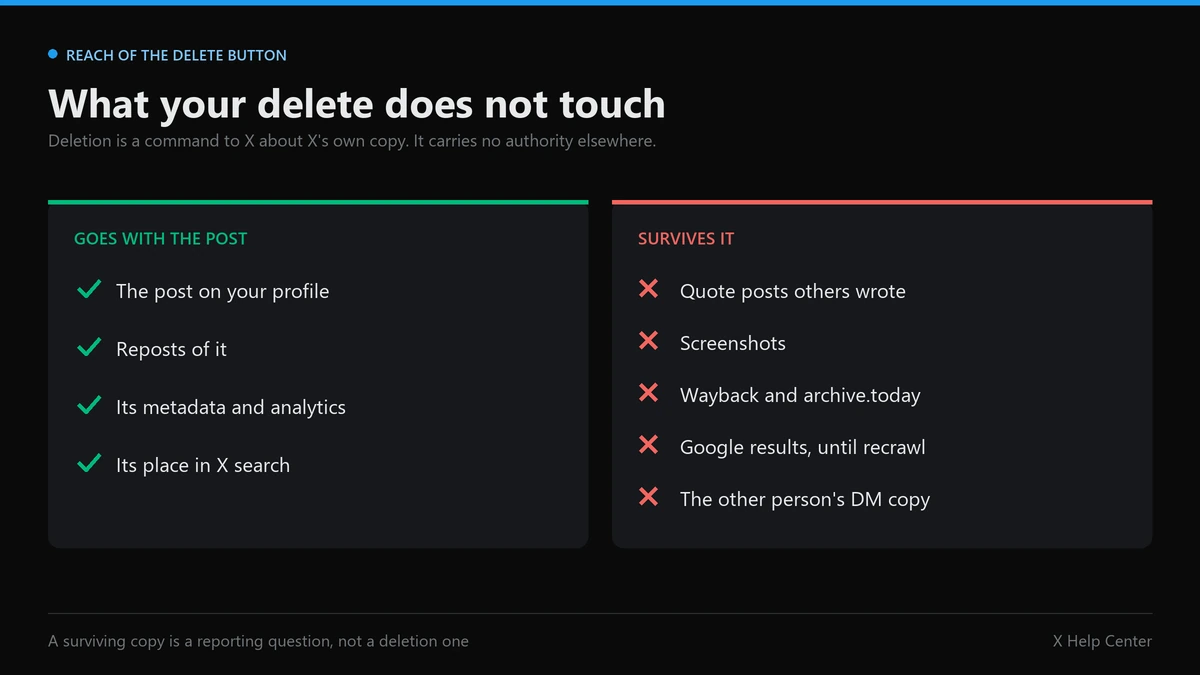
The last row matters most when the data has been weaponised. A listing deleted on Monday is still inside a screenshot posted on Sunday. Learning how to remove your personal information from Spokeo protects the next search; it does nothing to the copies already circulating.
Which privacy laws let you delete more than one listing?
State privacy laws add a deletion right that reaches beyond the opt-out form, and California adds a broker-wide tool.
Section 7 of Spokeo's privacy policy describes rights to know, correct and delete personal information, filed through a web form or by phone at 1 (877) 864-0183. Requests must carry enough matching information for Spokeo to find the record. An authorized agent may file for you, though the policy says category disclosures to agents go only through the toll-free line. For California residents, the Delete Act created DROP, the Delete Request and Opt-out Platform: the state privacy agency says residents could use it from January 1, 2026, and that registered data brokers must process DROP requests at least once every 45 days from August 1, 2026. One DROP request covers every registered broker, Spokeo included, which suits anyone who wants to remove personal information from Spokeo and its competitors at the same time.
Outside California, the per-site opt-out remains the main tool. Paid removal services file the same forms on a schedule; check that any such service names the brokers it covers and never asks for a password. Twitter Ban Service does not file broker opt-outs or DROP requests; those stay with you or a removal service you choose, and its work starts only where a copy has reached X.
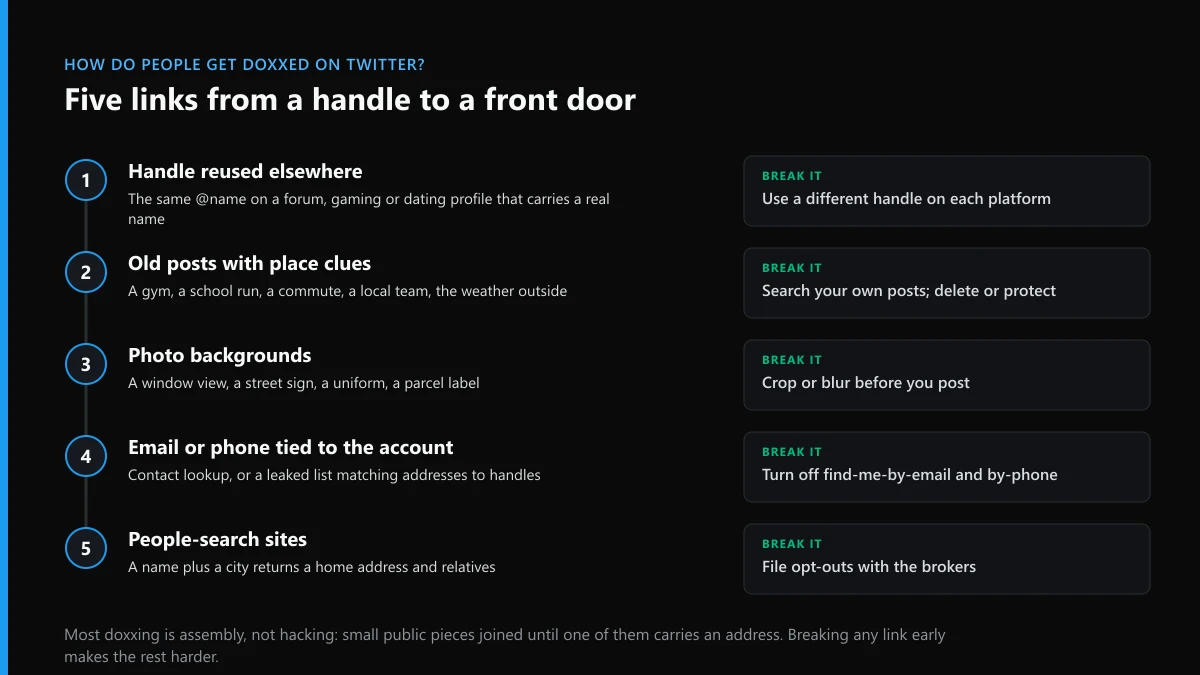
When does Spokeo data turn into a doxxing or impersonation problem on X?
It becomes an X problem once someone posts the address or builds a fake profile from it.
X's private information and media policy bars sharing someone's home address or other private details without permission, and it lets the affected person or an authorized representative report it. A Spokeo listing being public does not make a post of your home address acceptable on X. When the post is real, report it in the app under private information, save the post URL, and keep the Spokeo confirmation emails as proof that you withdrew the source. An account using your name and photo is a separate case; X's process for suspending accounts that break its rules explains what reviewers weigh. Twitter Ban Service files the report and assembles the evidence, but X makes every decision on the post or the account, and repeated reports do not change that. If leaked photos or files appear with the address, the copyright route for leaked content on X can run alongside the privacy report.
A suspension is the end point only for accounts that keep breaking the rules; our explainer on how a Twitter ban is decided covers the stages before it.
Where else does listing data get misused, and which route fits?
The same details often travel to other apps, and each platform has its own report path.
| Platform | Typical misuse of listing data | Route guide |
|---|---|---|
| Fake profile using your name and town | Facebook impersonating-account reports | |
| Post naming your address or relatives | Facebook post removal, matched by case | |
| Threats to publish your details unless paid | blackmail scams run over Facebook | |
| False accusations tied to your real identity | handling libel posted on Facebook | |
| Your photos reused in someone else's posts | Facebook copyright claims compared with X | |
| Scam ads or listings using your name | reporting a Facebook ad scam or reporting a Marketplace seller | |
| TikTok | Account posing as you | TikTok impersonation and removal requests |
| TikTok | Seller or creator scamming with your details | reporting a scammer on TikTok |
| Snapchat | Account sharing your address or photos | Snapchat account deletion requests and Snapchat takedown steps |
| YouTube | Video that shows your home or full name | the YouTube privacy complaint process |
| YouTube | Upload of your own footage | filing a YouTube copyright strike |
| Your number circulated in groups | what a WhatsApp takedown can mean |
A YouTube channel built around harassing one person needs a different path from a single video; compare getting one YouTube video taken down with channel-level YouTube takedowns. If an impersonation account on TikTok keeps returning, the notes on TikTok account ban requests explain what the platform reviews.
What we decline
Twitter Ban Service does not take cases against people who follow the rules, does not file false reports, and does not run report bots. Volume does not move a review: our pages on how YouTube reviews mass flags, which Snapchat reports count and what a WhatsApp report actually sends show why. Nobody needs your password or a 2FA code, and no one can promise a removal on a platform they do not run.
FAQ
How do I remove my personal information from Spokeo for free?
Use the opt-out form at spokeo.com/optout, which costs nothing. Search for your listing on Spokeo, copy the web address of the profile that matches you, paste it into the form with an email address, and click the link in the confirmation message Spokeo sends. That is the whole process for one listing, and it does not need a Spokeo account, a card or an ID document. Paid removal services charge for convenience, since they repeat the same form across many brokers on a schedule, but the Spokeo opt out personal information removal step itself stays free. If you have several listings under name variants, submit each URL separately, because the form handles one record at a time. Keep the confirmation emails in a folder. They show when you filed, which helps if a listing reappears and you need to appeal a refusal under your state privacy law, or show a platform that you withdrew the source.
How long does it take to remove personal information from Spokeo?
Spokeo's privacy policy, revised October 20, 2026, says listing removals are processed in real time once the submission is complete, meaning after you click the email confirmation link. In practice, third-party opt-out guides published in 2026 report that the profile can still show up for one to three days, usually because of caching on Spokeo's side or in your browser. Check again from a private window after a few days. Search engines take longer: Google may keep showing the old title and snippet until it recrawls the page, and you can ask it to refresh an outdated result once the listing returns an error. If the profile is still live a week after confirmation, write to Spokeo's customer care with the listing URL and the date you filed. Do not file the form dozens of times for the same URL; one confirmed request is what counts.
Why did my information come back on Spokeo after I opted out?
Because the opt-out removes one listing, not you as a person. Spokeo's policy states that information about you may appear in a different or new listing in future searches, and its records are rebuilt from public sources such as property records, phone directories and court files. When a new record is created under a slightly different name, a new city or a new phone number, it gets a new URL that your earlier request never covered. People who search how to remove personal information spokeo a second time usually hit this, and the fix is routine: search every name variant every two or three months, file the form for each new URL, and keep the confirmations. California residents can add a DROP request, which tells every registered broker to delete matching records and to keep processing deletions on a cycle. Elsewhere, a state deletion request under Section 7 of Spokeo's policy can reach data that the listing form does not.
Does the Spokeo opt-out remove my data from Google and other sites?
No. The opt-out hides the Spokeo listing and nothing outside it. Other people-search sites run their own databases and need their own requests, and Spokeo's policy says removal does not apply to third-party sources such as phone books, social networks or government records. Google is a separate case: once the Spokeo page stops loading, Google drops it at its next crawl, and you can speed that up with its tool for outdated content. If a Google result still shows your address on a page that is live, Google's own personal-information removal request is the route. The step that people forget is social media. Screenshots and reposts of a listing are new copies that belong to whoever posted them, so they are reported to that platform under its privacy rules. Knowing how to remove your personal information from Spokeo, listing by listing, protects future searches only.
Can someone else remove my personal information from Spokeo for me?
Yes, in two ways, and both answer how to delete personal information from Spokeo for a relative. The opt-out form is tied to a listing rather than an account, so a family member or a paid removal service can submit a listing URL with an email address they control and click the confirmation themselves. For broader requests to know, correct or delete personal information, Spokeo's privacy policy accepts an authorized agent and says it asks the agent for no extra proof, although it will disclose categories of personal information to an agent only through its toll-free line. Pick a helper who explains exactly which brokers they cover and how often they re-check. Be wary of any service that wants your passwords, your email login or remote access to your phone, because none of those are needed to file a broker opt-out. The same applies to help with posts on X: a report about your private information never requires your account credentials.
What should I do if my Spokeo details were posted on X?
Treat it as a private information report on X, separate from the Spokeo opt-out. X's private information policy covers posting someone's home address or similar details without permission, and the affected person or an authorized representative can report it. Copy the post URL and take a screenshot first, because the poster may delete it once reported and you may need the record later. Then report it from the post's menu under private information. Remove the source listing on Spokeo too, so the address is harder to find again, and keep both sets of confirmations together. If the account also uses your name or photos to pose as you, report that under impersonation as a second case. Twitter Ban Service can file that report and organise the evidence, yet X reviews it against its rules and decides the outcome. Sending dozens of reports from friends does not change the decision and can make your genuine report look like a coordinated campaign.
How to remove my personal information from Spokeo if I live outside California?
Use the listing opt-out first; it works for anyone, wherever they live. Then look at your state's privacy law. Spokeo's privacy policy lists rights to know, correct and delete personal information for residents of several states, and it gives residents of states including Colorado, Texas and Virginia an appeal route through privacy@spokeo.com when a request is refused. Those requests run through Spokeo's privacy web form or its phone line, and you must give enough matching information for Spokeo to find your record. DROP, the broker-wide deletion platform, is open only to California residents, so people in other states repeat individual opt-outs across brokers or pay a service to do it on a schedule. Court records are the main exception everywhere: Spokeo says it removes them only when you send an expungement or sealing order to expungement@spokeo.com. Whatever route you choose, nobody needs your account passwords to file it.