15 November 2026 · Twitter Ban Service · ~14 min read
TikTok content removal service: what can be removed, and by whom
A TikTok content removal service cannot press delete on TikTok's behalf. Only the account owner removes their own posts or account, and only TikTok removes someone else's video or profile, after a report or a legal notice. TikTok's help center says a post you delete stays in its system for up to 30 days, so a slip can still be restored.
What can a TikTok content removal service actually remove?
On its own, nothing: every removal on TikTok happens through the owner's settings or through TikTok's review of a report.
A TikTok content removal service is a paid helper that claims to get videos, comments or whole profiles off TikTok. The honest version of that job splits into two very different tasks. When the content is yours, the work is a few taps in the app, and anyone selling it is charging for instructions TikTok publishes free. When the content belongs to someone else, the work is evidence: the right report reason, the right legal form, the right proof, and then a wait for TikTok's decision.
Twitter Ban Service sits outside both halves where TikTok is concerned. It reviews and files reports on X, and this page lays out the TikTok side so you can do it yourself or judge whoever offers to.
| Task | Who can do it | Where it happens | Can a helper do it for you? |
|---|---|---|---|
| Delete your own post | You, logged in | More options ... then Delete | Only by logging in as you, which no honest helper asks for |
| Deactivate or delete your account | You | Settings and privacy, Account, Deactivate or delete account | Same: it needs your login |
| Turn a business account back into a personal one | You | Settings and privacy, Account, Business verification | Same |
| Remove a follower or a logged-in device | You | Followers list; Security & permissions, Manage devices | Same |
| Get another person's post taken down | TikTok, after a report | Report button or TikTok's web forms | It can help prepare evidence; TikTok decides |
| Get an impersonator's account removed | TikTok, after review | Pretending to Be Someone report or the ID form | Same: preparation only |
Read the table from the bottom up and the sales pitch shrinks. The rows a stranger could touch all end with TikTok's own review.
How to remove a TikTok post, and undo it inside 30 days
Open the video, tap the More options ... button on its side and tap Delete; that is the full answer to how to remove a TikTok post you own, per TikTok's article on editing, posting and deleting.
- Go to the video you want gone, for example from your profile grid.
- Tap More options ... on the side of the video.
- Tap Delete.
Deletion is not instant erasure. The same help article says a deleted post stays in TikTok's system for up to 30 days before it is permanently deleted, and during that window it waits under Settings and privacy, Activity center, Recently deleted. Tapping Restore there puts it back on your profile with its comments and likes. One exception catches creators out: if you made a Duet or Stitch and the original creator deleted their video together with all its Duets and Stitches, yours cannot be recovered.
So how do I remove a post on TikTok for good? Delete it and leave Recently deleted alone until the 30 days pass.
Anyone asking how to remove a post from TikTok that another account uploaded needs the report routes further down, because the Delete option only appears on your own videos. Instagram works on the same owner-first principle, as the removal ladder for an Instagram account, post or reel shows.
How to remove a TikTok account: deactivate or delete?
Both options sit in one menu: Profile, the Menu ☰ button, Settings and privacy, Account, then Deactivate or delete account.
That path comes from TikTok's delete your account article, and it only works from inside the account. Twitter Ban Service has no route into that menu and never asks for one.
The choice decides whether you can come back. TikTok's deactivation article calls deactivation a temporary hold: no one sees your content or profile, TikTok keeps your data, and logging in with the same credentials and tapping Reactivate brings the account back. Two leftovers surprise people. Direct messages you already sent may stay visible to the people who received them, and Duets or Stitches made with your videos may stay up for others to watch.
Deletion is the permanent path, and TikTok refers to its Privacy Policy for what happens to your data afterward. If you are working out how to remove account on TikTok because you never want it again, delete. If you need a break, or someone is watching your profile and you want it out of sight while you decide, deactivate first, since that can be undone by simply logging back in.
Searching how to remove a TikTok account that belongs to somebody else is a different question with a shorter answer: you cannot, and TikTok only removes it after its own review.
How to remove business account on TikTok without starting over
You usually switch it rather than delete it: Settings and privacy, Account, Business verification, then follow the steps to change the account type.
TikTok's account types article names three kinds of account: General TikTok Accounts, which it also calls Personal Accounts, Verified Business Accounts and Organization Accounts. Moving a business profile back to a general one keeps the username, followers and videos in place. The catch is verification. TikTok advises against switching back and forth, because your business verification is not saved, so returning later means verifying the business again, and TikTok says approval can take up to 5 business days. The same article adds that a business account that skips a verification request may be converted to a General TikTok Account automatically, with business tools restricted.
If the business account should vanish altogether, the Deactivate or delete account option in the Account menu applies to it just as it does to a personal profile. For people who want a brand page and personal posting at the same time, TikTok's own suggestion is two separate accounts, not one that toggles. Twitter Ban Service has no part in account-type changes on TikTok or on X; they belong to the owner alone.
How to remove someone from your TikTok account
First work out what access the person has: are they a follower you no longer want, or someone who knows your login and is still signed in?
A follower
TikTok's removing followers article gives two paths. Open Profile, tap Followers, tap the More actions button next to the person and choose Remove this follower. Or open their profile, tap the Share button at the top and pick Remove this follower there.
Someone who still has access
- Change the password: Settings and privacy, Account, Password.
- Open Settings and privacy, Security & permissions, Manage devices, review the list and remove every device you do not recognise.
- Under Account, Account Information, Phone number, link a number only you control.
Those three steps come from TikTok's hacked account article, which also lists the warning signs: a changed password, phone number or username, videos deleted or posted without you, and messages you never wrote. An ex-partner, a former social media manager or a family phone that was once shared are the usual reasons people search how to remove someone from your TikTok account. In each of those cases the fix is done by you, inside your own settings. Twitter Ban Service never asks for a TikTok or X password, and a helper who wants your password to remove that person for you is asking for exactly the kind of access you are trying to take back.
How to get a TikTok account removed when it isn't yours
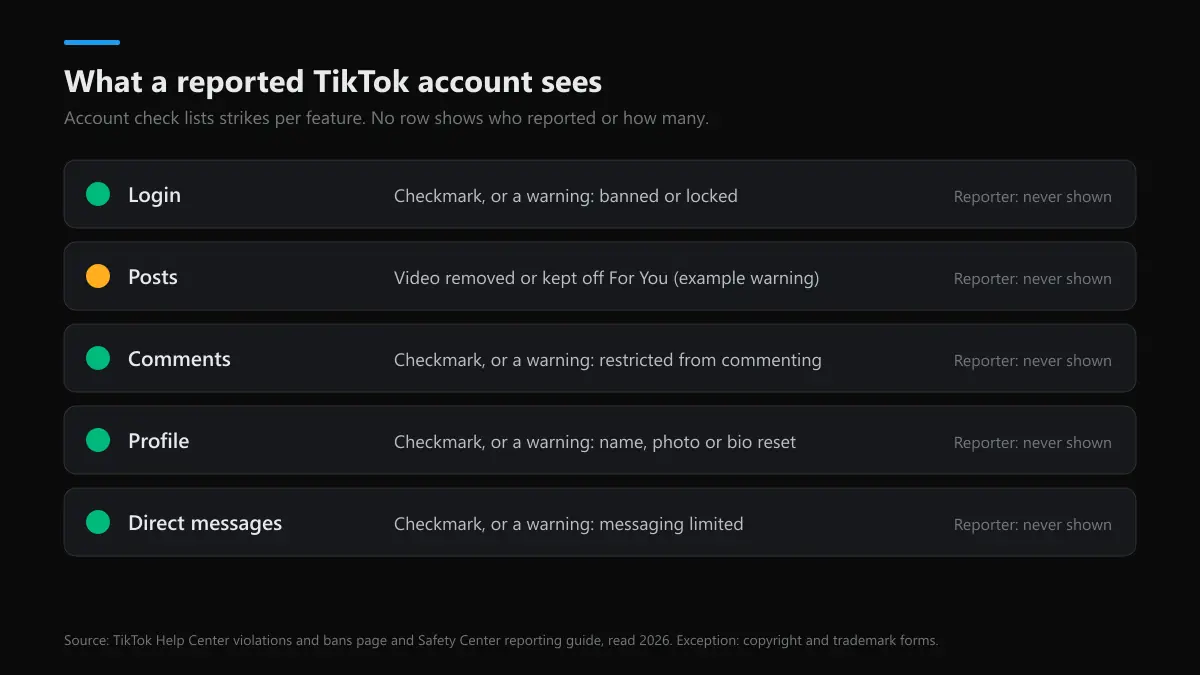
You report it under the reason that matches the real violation, and TikTok's reviewers decide; nobody outside TikTok can delete it.
Twitter Ban Service files the equivalent reports on X only, so on TikTok the reporter is you, using the paths below.
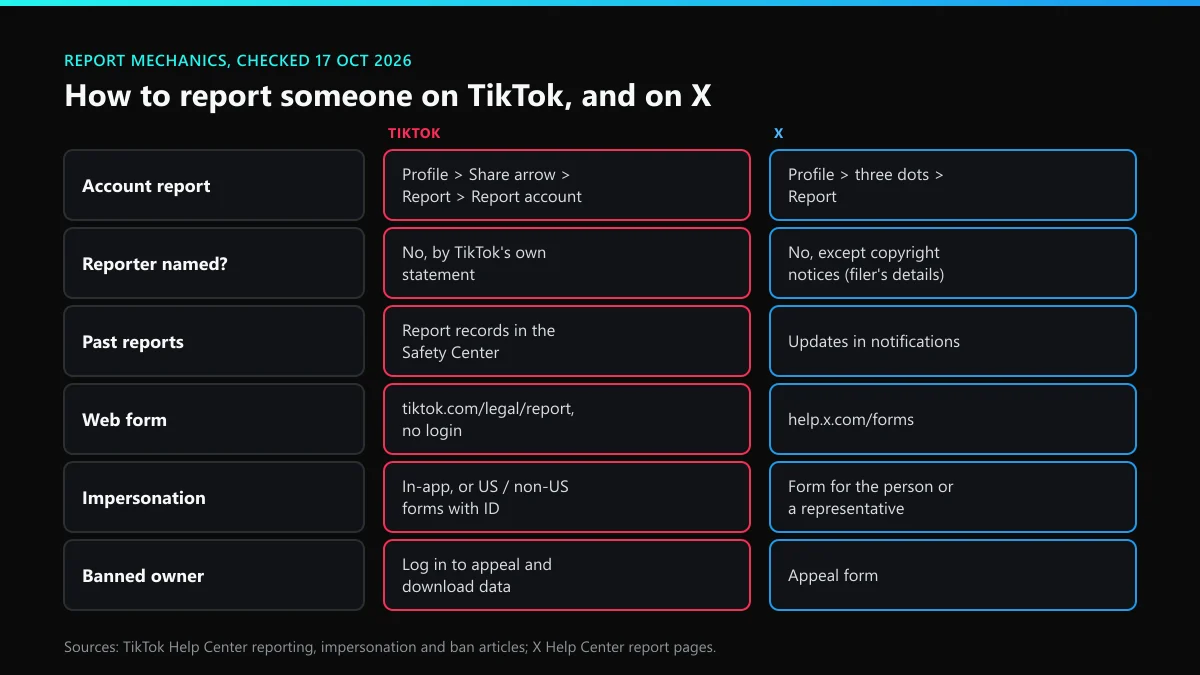
For a single video, TikTok's report a post article describes the path: tap the Share button or press and hold the post, tap Report, pick a reason and a subtopic if asked, then Submit. On a web browser, the More options ... button on the video holds the same Report entry. That reason-first logic is the same one used for reporting a single post on Instagram.
For a fake profile, the in-app path is the profile's Share button, Report, Report account, Pretending to Be Someone, then Me or Celebrity. TikTok's impersonation reporting article also links two web forms. The U.S. form asks you to upload valid identification and add an electronic signature; the form for accounts outside the U.S. uses the topic Report a potential violation, the category Account violation and the reason Impersonation. When the same person copies you on several apps, the impersonation steps for Instagram and X can run at the same time.
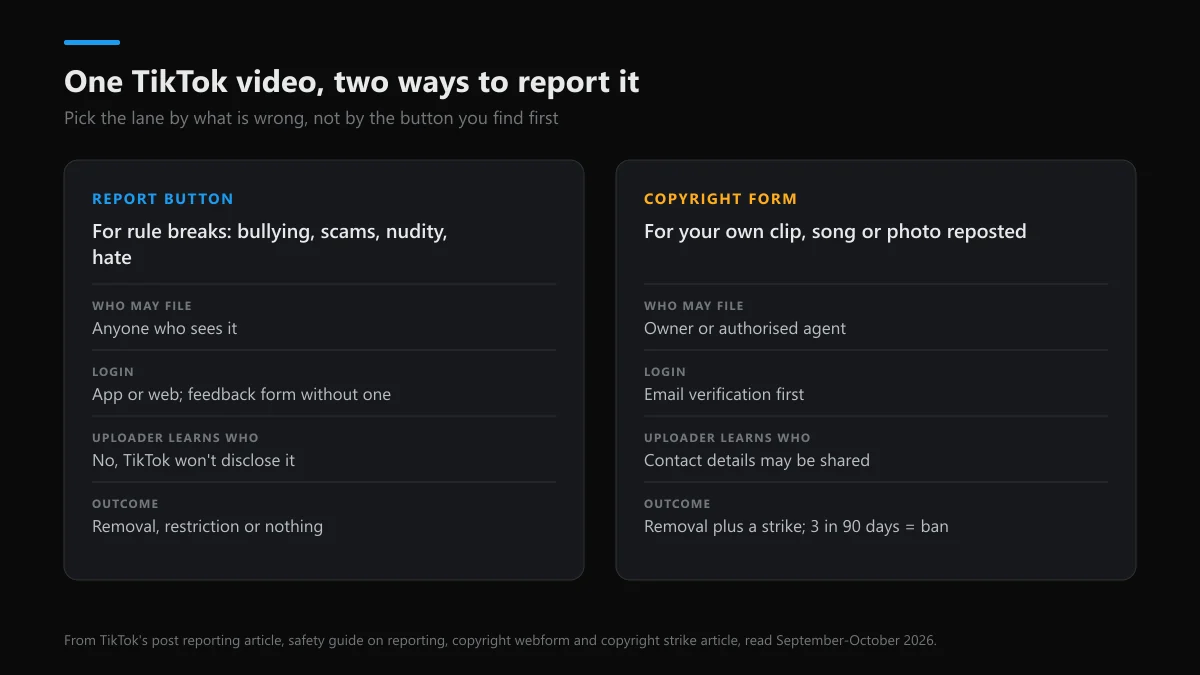
Your own clip, song or photo reposted by someone else is an intellectual property case, filed by the owner or an authorised agent; the walkthrough of TikTok's copyright report form covers its fields. Defamation, privacy breaches and court orders follow legal channels, much as Instagram's legal request forms do on Meta's side.
How to get a TikTok account removed as a whole, rather than one video, comes down to whether its violations amount to a ban under TikTok's rules. The breakdown of TikTok's ban list for someone else's account maps those lines, and removing someone else's Instagram or X account covers the same question on two more platforms.
Is there a best TikTok content removal service, and how do you vet one?
No independent ranking of these providers exists, so the honest answer to best TikTok content removal service is a checklist rather than a name.
Search the keyword and the results include freelance listings that bundle copyright notices with mass reporting, which is the first sign of trouble. TikTok account removal services that sell volume are selling something TikTok's review ignores, and a false report breaks TikTok's rules for the person who files it. Use these tests before paying anyone:
- It asks for your password or a login code. Walk away: your own content needs only you, and someone else's needs only a report.
- It promises guaranteed removal or a fixed deadline, even though TikTok's reviewers decide and no outsider controls their queue.
- It offers report packages, bots or "mass report" bundles.
- It will not name the route it plans to use, whether a Community Guidelines report, an impersonation form or a copyright notice, or explain why that route fits your evidence.
- It agrees to go after a critic, a competitor or an ex who has broken no rule.
- It charges for steps the app gives you free, such as deleting your own post or account.
The buyer's reality check on TikTok ban services goes deeper into pricing claims, and the takedown routes that exist on X, Meta, YouTube and TikTok lists which official forms each platform runs.
What we decline
Twitter Ban Service files reports on X and leaves every TikTok decision to TikTok. It declines requests to file on TikTok, to report an account that follows the rules, to send reports in bulk, or to log in to anyone's account. On X, scripted bulk actions also hit the platform limits explained in the rate limit exceeded on Twitter guide. If the trouble is your own X account, reaching X customer service through its official channels is the free first step, and a handle someone else holds is covered in why a Twitter username shows as unavailable.
Sources
- TikTok Help Center: editing, posting and deleting, delete your account, deactivate your account and account types on TikTok, read 15 November 2026.
- TikTok Help Center: my account has been hacked, removing followers, report a post and report an impersonation account, read 15 November 2026.
FAQ
Is a TikTok content removal service legit?
Some are, but only when the service describes a job TikTok actually lets outsiders do. A legitimate TikTok content removal service helps you choose the right report reason or legal form, organises screenshots, links and dates, and tells you plainly that TikTok makes the decision. It never needs your password, because your own posts and account are removed from your own settings, and someone else's content comes down only after TikTok reviews a report. The red flags are easy to spot: guaranteed removal, a fixed deadline, mass report packages, or a request to target an account that has broken no rule. Those offers either resell free instructions or put you at risk of a false-reporting violation. Before paying anyone, try the free routes: the Report button on the post, the Pretending to Be Someone option for a fake profile, or the copyright form for your own work. If those fail, a helper can only resubmit through the same channels.
How do I remove a post on TikTok, and can I get it back?
Open the video, tap the More options ... button on its side and tap Delete. That is how to remove a TikTok post you own, and it works the same whichever screen you open the video from. TikTok's help center says the deleted post stays in its system for up to 30 days before permanent deletion. Inside that window you can restore it: Profile, Menu, Settings and privacy, Activity center, Recently deleted, then tap the post and Restore, and its comments and likes return with it. A Duet or Stitch is the exception, because if the original creator deleted their video along with all its Duets and Stitches, yours cannot be recovered. If you are asking how to remove a post from TikTok that another person uploaded, the Delete option is not available to you. Report it under the reason that fits, or use the copyright form when the content is your own work.
How do I remove a TikTok account permanently?
Go to Profile, tap the Menu button, open Settings and privacy, tap Account, then Deactivate or delete account, and follow the delete instructions. That is how to remove a TikTok account you own for good. The same screen offers Deactivate, which TikTok describes as a temporary hold: nobody sees your profile or videos, your data is kept, and logging back in and tapping Reactivate restores the account. Deactivation is the safer first move when you are unsure, since it can be undone. Neither option erases what other people already hold. Direct messages you sent may stay visible to their recipients, and Duets or Stitches built on your videos may remain. For how to remove account on TikTok when the account is not yours, no settings path exists; you report it and TikTok decides. Anyone offering to delete an account for you by logging into it is asking for credentials you should never hand over.
How do I remove a business account on TikTok?
In most cases you switch it instead of deleting it. Open Settings and privacy, tap Account, then Business verification, and follow the steps to change the account back to a General TikTok Account; your username, followers and videos stay. TikTok's account types article warns against switching back and forth, because business verification is not saved, and becoming a Verified Business Account again later means a fresh verification that TikTok says can take up to 5 business days. If the account itself should disappear, the Deactivate or delete account option in the Account menu is the route, exactly as for a personal profile. That covers how to remove business account on TikTok in both senses of the phrase. TikTok's advice to anyone who wants a brand presence and personal posting at once is to keep two separate accounts rather than toggle one.
How do I remove someone from my TikTok account?
That depends on the access they have. If the person is only a follower, open Profile, tap Followers, tap the More actions button next to their name and choose Remove this follower; their profile's Share button offers the same option. If they know your login or are still signed in on their own phone, change your password under Settings and privacy, Account, Password. Then open Security & permissions, tap Manage devices and remove anything you do not recognise, and link a phone number that only you control. Those steps come from TikTok's own hacked-account article. That is how to remove someone from your TikTok account whether they are an ex-partner, a former manager or a relative on a shared device. No outside service needs your password for any of it, and one that asks would simply become the next person with access to your account.
How do you get a TikTok account removed if it impersonates you?
Report it as impersonation, with proof that you are the real person. In the app, open the fake profile, tap the Share button, tap Report, choose Report account, then Pretending to Be Someone and Me. TikTok also takes impersonation reports through web forms: the U.S. form asks you to upload valid identification and sign electronically, and the form for accounts outside the U.S. uses the topic Report a potential violation, the category Account violation and the reason Impersonation. This is the cleanest answer to how to get a TikTok account removed, because impersonation is a clear rule break with its own form. TikTok reviews the report and decides, and piling on more reports does not change that review. If the same impersonator also runs a copy on X, report that one on X as well, since each platform acts only on the copy it hosts.
What is the best TikTok content removal service?
There is no independent ranking, so any page that crowns the best TikTok content removal service is marketing. Judge a provider by what it refuses. It should refuse your password and login codes, guaranteed outcomes, fixed deadlines, mass reporting and any target that has not broken TikTok's rules. It should name the exact route it plans to use, whether a Community Guidelines report, an impersonation form or a copyright notice, and explain why that route fits your evidence. It should also tell you which steps are free and self-serve, such as deleting your own post or account. Many TikTok account removal services listed on freelance marketplaces fail those tests by selling report volume. A provider that works only on X, as this site does, is not a candidate for a TikTok-only problem; there, the official routes described above are where to start.