2 November 2026 · Twitter Ban Service · 16 min read
If you report someone on YouTube will they know? What each report puts on their screen
If you report someone on YouTube will they know? Not from an ordinary flag: YouTube Help says reporting is anonymous, so other users can't tell who filed it. They only see an outcome, such as a removal notice naming the policy. The real exception is a copyright removal request, where YouTube says it must legally share certain information with the uploader.
You argued, you flagged: if you report someone on YouTube will they know?
Usually nothing reaches them at all unless YouTube acts. Say you traded insults under a video last night, flagged it this morning, and now wonder whether the uploader has your name. YouTube's page on reporting content is flat about it: "Reporting content is anonymous, so other users can't tell who made the report." It also says that reported content is "not automatically taken down", so the flag on its own changes nothing on their channel, and YouTube documents no notice sent for a flag alone.
If reviewers do find a violation, the uploader hears about the removal. YouTube's enforcement FAQ says creators are notified "over email and on their Channel Settings", and the Community Guidelines strike page says the email covers what was removed, which policy it broke, the effect on the channel and the next steps. A reporter's name isn't on that list.
So they can learn that something happened without learning who started it. Twitter Ban Service, an X-focused reporting service working through X's official channels, sees this same worry when disputes spill over from YouTube, and the answer turns on which form you used, far more than on which platform you are on.
Six report types, one matrix of what the other person sees
When you report someone on YouTube is it anonymous? For four of the six routes below, yes. Copyright is the plain exception, and a legal notice under EU law sits in between. Read across the row that matches what you filed. Twitter Ban Service checked this table against YouTube Help on 2 November 2026.
| What you filed | What the uploader is told | Can your identity reach them? | What you can see afterwards |
|---|---|---|---|
| Video or Short flag | Nothing documented for the flag; a notice by email and in Channel Settings if it is removed or restricted | No. YouTube calls reporting anonymous | Reporting History: Live, Removed or Restricted |
| Comment report | May be told the comment was removed or that commenting is paused | No. Comments sit under the same anonymous reporting page | No documented history; look at the comment itself |
| Channel report | Nothing documented for the report; a strike or removal notice if YouTube acts | No, by the same rule | No documented tracker; look at the channel |
| Privacy complaint | May be given time to remove or edit the private detail | YouTube says it won't share your name or contact info | Look at the video; Reporting History is described for flagged videos |
| Copyright removal request | Strike notice from no-reply@youtube.com; claimant's name under Copyright, See details, in Studio | Yes. YouTube says it must legally share certain information | Your request in YouTube Studio, under Content detection |
| Legal notice under the EU DSA | A statement of reasons if the content is restricted | Only "where strictly necessary" under Article 17(3)(b) | The decision, sent "without undue delay" under Article 16(5) |
Three rows deserve a closer look. On the privacy complaint page, YouTube promises "we won't share your name or contact info with the person who posted the content", though the first-party rule for privacy complaints means the complaint is normally about you, and the person in the video may draw their own conclusion. The copyright removal request page reads differently: "Legally, we're required to share certain information with the uploader." YouTube adds that an authorized representative such as an attorney can submit for you, and warns that false information can lead to account termination or legal consequences. The Digital Services Act requires a notice to carry a name and email address, except for child abuse offences, while limiting when that identity goes further.
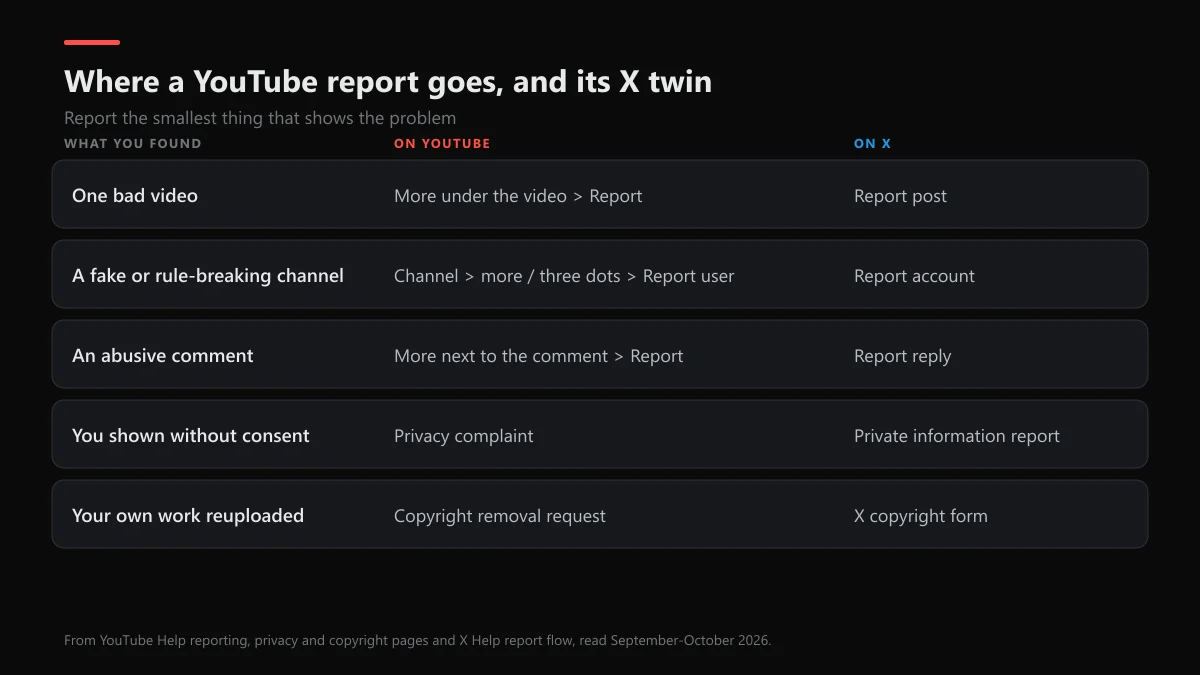
If I report a video on YouTube is it anonymous from YouTube too?
So is reporting a YouTube video anonymous once you count YouTube itself? No, only to other users. The report is tied to your signed-in account, which is how a personal history can exist at all. If you report a video on YouTube is it anonymous across the app, the website and a TV? The help sentence is not limited to one surface. Signed out, the button only offers a sign-in prompt (seen on 22 September 2026). The search report YouTube video anonymous therefore has a narrow answer: hidden from people, visible to the platform. The menus for flagging a video or channel all sit behind a login.
How can someone still guess it was you?
People who search if you report someone on YouTube is it anonymous are often asking something else: will they work it out? Anonymity hides a name field, and it can't hide context. Nothing on the uploader's side confirms a guess, yet people do guess, and these are the patterns that make it easy:
- Timing after an argument. A removal notice that arrives the morning after a public row points at the other person in the row, right or wrong.
- A small audience. A channel with a few dozen viewers, or an unlisted video sent to three friends, leaves a short list of suspects.
- A comment only you saw. If one reply was aimed at you and vanishes, the commenter has a candidate.
- A report they can infer. A privacy complaint about your face, or a removal of a clip only you objected to, identifies its subject even though no name is passed along.
- Your own words. "I reported you" in the comments gives away what the system kept hidden.
The fix is dull. Don't announce it, don't reply again, and don't send friends to flag the same video. If the person does accuse you, a denial or a confession is your choice; YouTube won't settle it for them, and a notice with no reporter's name leaves them with a theory and nothing more.
Other platforms behave similarly with different screens. TikTok shows the reported side an Account check page of its own, and Instagram has its own notices, covered in what an Instagram user can work out after a report. On X the reported account isn't told who filed either, and a copyright notice is again the exception.
What happens if you report someone on YouTube?
Reviewers look at the flagged content, and the reporter's side stays quiet. YouTube's enforcement FAQ says "Trained human reviewers evaluate flagged videos" to confirm a real policy breach. The outcome is one of three: the content is removed, it is restricted (usually by age), or it stays up. The flag is a request to look, never a vote, and that holds for all three things people report.
What happens if you report a video on YouTube?
The video joins a review queue and stays visible meanwhile. Reviewers judge it against all the Community Guidelines, regardless of the reason you picked, according to the flags section of the Google Transparency Report. So the wrong reason doesn't sink a real violation, and the right reason doesn't save a false one.
What happens when you report a comment on YouTube?
The comment help page says: "If someone reports your comment and it violates our Community Guidelines, it gets removed." The commenter may be told the comment was removed or that commenting is paused on their account. Automation carries most of this load. Between April and June 2026 YouTube removed 1,551,576,962 comments, and only 2,230,906 of those were first flagged by humans, per the Transparency Report. Only the video's owner can delete a comment outright; you can report it, and they may also hold or block words.
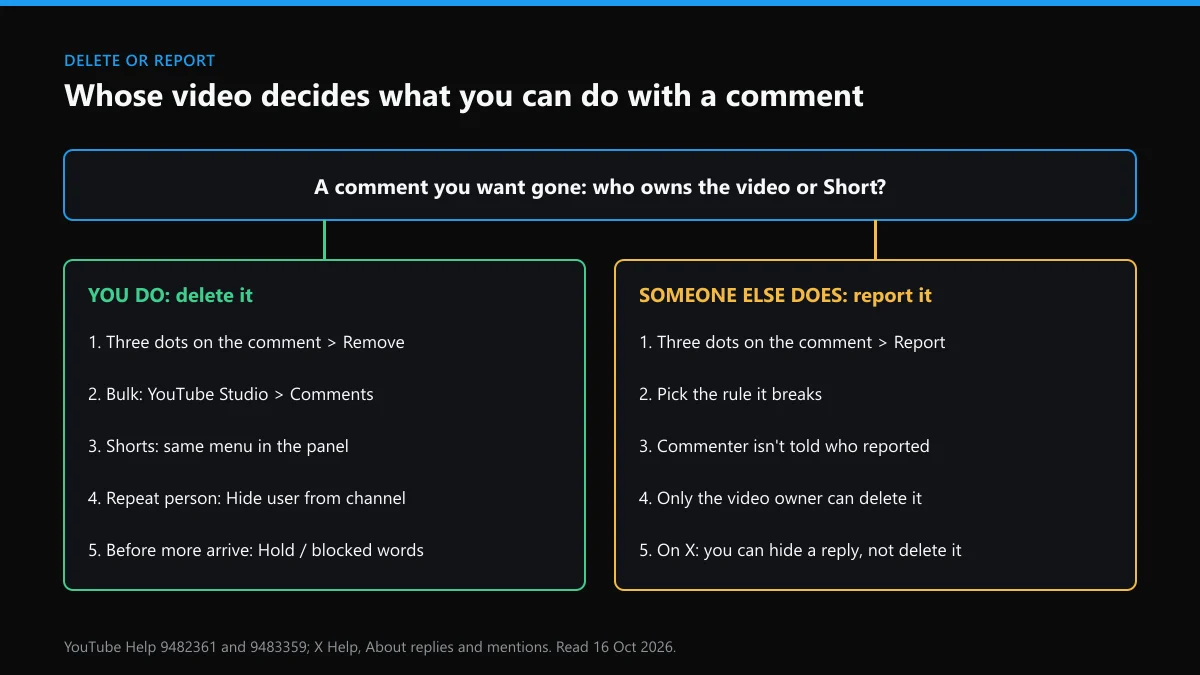
Reporting a person rather than one post
A channel report asks YouTube to look at the account as a whole. Action arrives as a warning, a strike or, at the far end, removal of the channel; three strikes in the same 90-day period may end it permanently.
Do more flags push it through?
No, and anyone with a grudge should stop here. YouTube says it has systems that identify "suspicious or exceptionally high flagging volumes". Between April and June 2026 users sent 82,393,855 human flags on 23,484,860 videos, while just 123,855 of the 11,159,676 videos removed were first detected by users (Transparency Report). A rule-abiding video collects flags and stays up. Rallying friends doesn't turn someone you dislike into a violation, and Twitter Ban Service won't tell you otherwise on any platform.
Where reported videos show up, and what an accidental flag does
The list of reported videos YouTube keeps for you sits at youtube.com/reporthistory, described on the Reporting History page and available for videos only. It is newest first, with three statuses. Live means "either not yet reviewed or that we decided don't violate", so it never tells you which. Removed is the YouTube report video removed result people hope to see. Restricted covers limits like age-restriction.
The limits matter more than the labels. Flag a video twice and it shows only your latest report. A flagged video can be missing entirely, because many others already flagged it and review is running on those flags. "Information about this video isn't available" means the creator removed it, or it isn't available in your country. None of these statuses tells you who else reported it, or what the uploader was told.
Is there a YouTube comment report history?
Not one YouTube documents. The Reporting History page covers videos, so the only check on a reported comment is whether it's still there. Treat any third-party claim of a YouTube comment report history with suspicion.
I accidentally reported a video on YouTube
Twitter Ban Service read YouTube's reporting and history pages on 2 November 2026 and found no way to withdraw a flag, so the honest answer to how to un-report a video on YouTube is that you can't. An accidentally reported YouTube video rarely matters. A mistaken flag on a rule-abiding video gets no action, the video stays up, your history shows it as Live, and nothing tells the uploader. If the video does break a rule, a reviewer may act on that violation; your slip didn't create it. Copyright is the exception here too: a removal request can be pulled back with Retract in YouTube Studio or by email from the address used, which YouTube's retraction help described when last read on 22 September 2026.
Your video was removed: the same events from the creator's chair
A YouTube video removed for violating Community Guidelines doesn't mean a person reported it. Between April and June 2026, automated systems first detected 11,005,420 of the 11,159,676 videos removed (98.6%, Transparency Report). Hunting for a reporter is usually a hunt for someone who doesn't exist.
The notice tells you which policy applied. The strike rules start gently: "the first violation is typically only a warning", and optional policy training makes it expire after 90 days from completion. A first strike then blocks uploads and other posting for one week, a second within 90 days blocks them for two weeks, and three in that period may remove the channel. To contest one, YouTube's appeal page points to the Channel violations card on the YouTube Studio Dashboard. You get 6 months for warnings and strikes and up to a year for content removals, and each strike can be appealed once. For that same quarter the Transparency Report lists 1,269,277 appeals and 87,953 reinstated videos.
A copyright strike is a separate system with a named claimant. It works in both directions: a counter notification requires your full legal name and physical address, and those go to the claimant.
When the dispute moves to Instagram or X
YouTube's answer stops at YouTube. People who lose an argument under a video often carry it elsewhere, and each platform takes its own report under its own rules:
- Abuse continuing in DMs or replies: the harassment report routes on Instagram and X.
- A named person on Instagram: filing against one Instagram user, or reporting a whole account or page when a single post isn't the problem.
- Threats to share images unless you pay or stay quiet: stop replying and open the blackmail and sextortion guide first.
- A photograph of you reposted without consent: options when someone posts your picture.
- Your video copied to Instagram: who may file an Instagram DMCA takedown, and expect the name-sharing rule to apply there as well.
- Your posts on X fading after the row: test your X account for a shadowban before assuming retaliation.
- Your X account suspended: appealing and reactivating a suspended account, and whether X runs a phone helpline at all before you trust a number you found online.
Twitter Ban Service works only on the X part of this and files nothing on YouTube. A case starts with a profile link and your screenshots, which we compare with the X Rules. If they show a real breach, we file through X's official channels, and X makes the final decision. We decline requests aimed at rule-abiding accounts, critics or competitors, and we don't do false reports, bots or fake accounts. Nobody here asks for your password or 2FA code, and no outcome is promised.
Sources
- YouTube Help, report inappropriate content (read 2 November 2026)
- YouTube Help, Reporting History (read 2 November 2026)
- YouTube Help, submit a copyright removal request (read 2 November 2026)
- YouTube Help, copyright strike basics (read 2 November 2026)
- YouTube Help, counter notification (read 2 November 2026)
- YouTube Help, Community Guidelines strike basics (read 2 November 2026)
- YouTube Help, appeal Community Guidelines actions (read 2 November 2026)
- YouTube Help, comment removals (read 2 November 2026)
- YouTube Help, privacy complaint process (read 2 November 2026)
- Google, YouTube Community Guidelines Enforcement FAQs (read 2 November 2026)
- Google Transparency Report, YouTube Community Guidelines enforcement, April to June 2026 (read 22 September 2026)
- Regulation (EU) 2022/2065, Digital Services Act, Articles 16 and 17 (read 22 September 2026)
FAQ
If you report someone on YouTube is it anonymous?
Yes for everyday reports, though the exact answer depends on the form. YouTube Help's sentence covers the flag menus: other users can't tell who made the report. That means video, Short, channel, comment, Community Post, live chat and ad reports. The person sees an outcome at most, such as a removal email or a paused comment function, and the notice describes the policy instead of the person who raised it. Privacy complaints also keep your name and contact details away from the uploader, though the complaint is normally about you. A copyright removal request is the clear exception, since YouTube says it must legally share certain information with the uploader and the claimant's name appears in Studio. When you report someone on YouTube is it anonymous to the company as well? No: YouTube itself still links the report to your signed-in account, and a court or legal process sits outside what these help pages cover.
If you report a video on YouTube is it anonymous on every device?
Yes. YouTube lists a phone, a computer, a TV app and VR as reporting surfaces, and its anonymity sentence isn't limited to one of them. So is reporting a YouTube video anonymous from the app as well as the website? As far as other users are concerned, it is. Anyone searching report YouTube video anonymous should know the limit: you have to be signed in, and your Reporting History ties that flag to your account on a computer. Nobody outside YouTube sees that list. There is no public count of flags on a video either, so the uploader can't watch a number climb or read who pressed the button. If you still want to reduce the odds of a good guess, stay out of the comment thread afterwards and don't mention what you did.
What happens if you report someone on YouTube who hasn't broken any rule?
Nothing happens to them. What happens if you report someone on YouTube is a check against the Community Guidelines, and an account that follows them keeps its videos and receives no documented notice. The same goes for what happens if you report a video on YouTube: the video stays up, your Reporting History shows Live, and that status also covers videos not yet reviewed, so you can't tell which applies. YouTube also says its systems identify suspicious or exceptionally high flagging volumes, and such flags are left out of its published data. Asking friends to pile on therefore adds nothing useful. If the real complaint is a disagreement, a rude opinion or a creator you dislike, block the channel and move on. Where there is a genuine violation, one accurate report that picks the closest reason does the job, because reviewers evaluate the whole video against the policies.
What happens when you report a comment on YouTube, and is there a history?
A reviewer or an automated system checks it, and YouTube's help page says that if the comment violates the Community Guidelines, it gets removed. The commenter may be told the comment was removed, or that commenting is paused on their account. They aren't told who reported it. What happens when you report a comment on YouTube that breaks no rule? It stays. You can't delete someone else's comment on another person's video, since that power belongs to the video owner, who can also hold comments or block words. As for a YouTube comment report history, the Reporting History page covers videos only and no comment version is documented, so look at the comment yourself after a few days. Reports made through the video menu show on that list; reports on comments, as far as YouTube's pages say, don't. Take a screenshot before reporting if you might need proof later.
Where can I see reported videos YouTube has on my account?
Open youtube.com/reporthistory on a computer. That is where reported videos YouTube links to your account appear, newest first, each with a status. Removed means YouTube took it down, which is the YouTube report video removed outcome. Restricted means a limit such as age-restriction. Live is the vague one, covering videos not yet reviewed and videos YouTube decided don't violate. If a video you flagged isn't listed, YouTube's explanation is that many others had already flagged it and review was running on those flags. If a video was flagged twice, only the most recent report shows. A line reading that information about the video isn't available means the creator took it down or it isn't available in your country. The page gives no reason for a decision, no reviewer's note and no count of other reports. So treat it as a status light, and not as a record of what the uploader was told.
How to un-report a video on YouTube after a misclick?
I accidentally reported a video on YouTube is a common worry, and the short answer is that you can't undo it, as far as YouTube's reporting and history pages show: they describe no withdraw button. An accidentally reported YouTube video is rarely a problem, though. A flag doesn't remove anything by itself; if the video follows the rules, no action follows, the status stays Live, and the uploader gets no documented notice about a flag. There is no need to message the creator, and flagging again only replaces the date in your list. If the video does violate a policy, it may come down because of that violation, and your misclick didn't cause it. A copyright removal request sent in error is different, and urgent, because it carries legal weight and can leave a strike. Retract it from YouTube Studio or by email from the same address, ideally the same day you notice.
Why was my YouTube video removed for violating Community Guidelines, and did someone report me?
Possibly, but automation is the likelier cause. Google's Transparency Report shows automated systems first detected 98.6% of YouTube videos removed from April to June 2026, with users first detecting about 1.1%. The notice you get by email and in Channel Settings states what was removed and which policy applied, and YouTube documents no reporter's name on it. A first violation is typically only a warning. After that come strikes, and three in the same 90-day period may remove the channel. To appeal, use the Channel violations card on the Studio Dashboard: 6 months for warnings and strikes, up to a year for content removals, one appeal per strike. A rejected appeal carries no extra penalty, according to YouTube. If your video was removed for a copyright reason, the claimant is named in Studio and the process runs on legal notices instead, so read that notice carefully before filing anything back.