15 November 2026 · Twitter Ban Service · 16 min read
How to report a Facebook group, whether you are in it, outside it or blocked by it
How to report a Facebook group: open the group, tap the three-dot menu in its header, choose Report group and pick the closest reason. Meta then checks the group against its Community Standards, not the report count. Its Transparency Center (updated 12 November 2024) says it removes groups that repeatedly violate them, including when admins post or approve violating content.
What happens when you report a Facebook group?
A group report asks Meta to review the whole group, not one post. The review covers its name, description and cover photo, plus what its admins, moderators and members publish, measured against the Facebook Community Standards. Reporting one post only puts that post in front of a reviewer. Meta's page on removing Pages and groups (updated 12 November 2024) lists what can take a whole group down: a name, description or cover photo that breaks the standards, an admin or moderator who creates violating content, and an admin or moderator who approves violating posts from members. The rule turns on one word. Meta says it "will remove Pages and groups that repeatedly violate the Community Standards", so a single bad post usually costs the post, not the group. Severe violations are the exception: the counting-strikes page (updated 23 April 2025) says some disable a group after one occurrence.
Twitter Ban Service is an X-only reporting service that checks accounts against the X Rules and files through X's own report channels. It has no button inside Facebook. Everything below about groups is something you, a member or a friend files directly with Meta.
That split shapes the rest of this guide.
How to report a group on Facebook when you are a member
Members have two routes: the group's own menu for the whole group, and each post's menu for the single posts that break a rule. The help page Report content on Facebook puts the principle plainly: the best way to report is the Report link near the content itself. For a group, that link sits in the group header.
- Save the evidence first. Copy the group's address (it starts with facebook.com/groups/), screenshot the name, cover and About section, and copy the links of the worst posts with their dates.
- Open the menu. In the group, tap the three-dot (More) menu in the header and choose Report group.
- Pick the reason that matches the behaviour. Scam, harassment, hate, impersonation or something else: choose the one a reviewer can confirm from what is visible, then follow the prompts and submit.
- Report the posts too. A group report plus two or three reported posts gives the reviewer concrete examples rather than a general complaint.
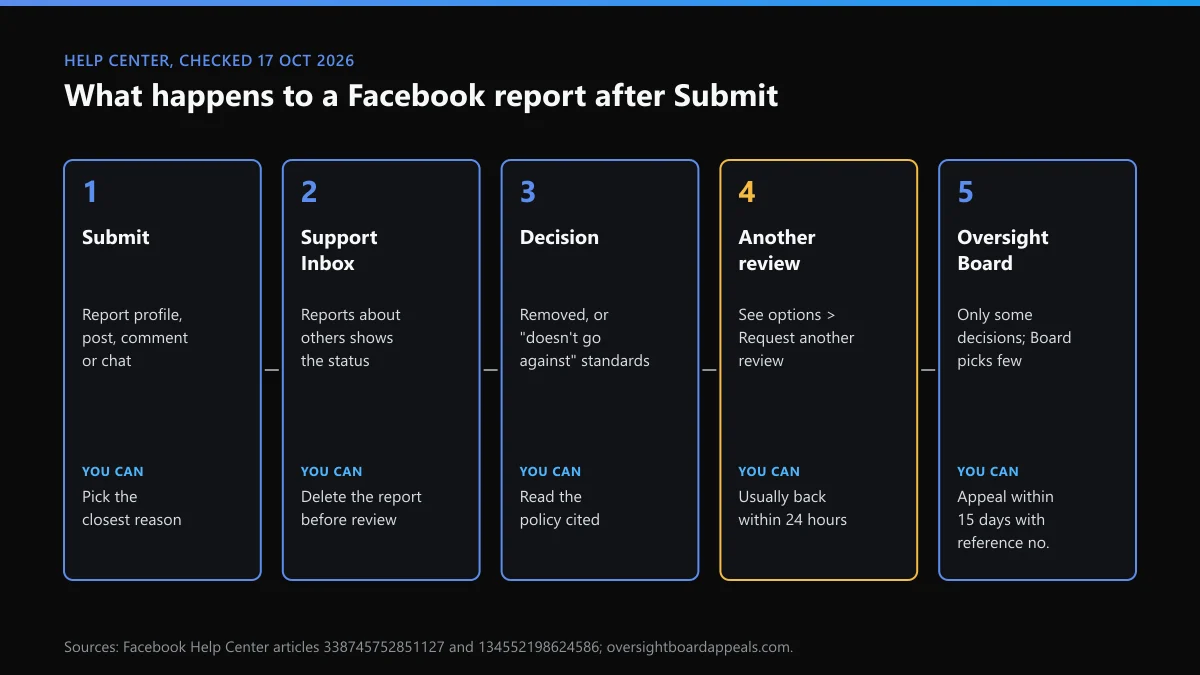
- Follow it in Support Inbox. If Meta leaves the group up and the option appears, Request another review is usually answered within 24 hours, according to Meta's Help Center.
Report the whole group or one post?
A post report fits when one member broke a rule in a group that is otherwise fine. The group report fits when the group itself is the problem: one created to sell tickets that don't exist, say, or one whose name and cover single out a real person. Most real cases need both. Twitter Ban Service keeps the same split on X, where a single post and a whole account go through different report flows.
Reporting to the admins is not reporting to Meta
Inside a group, a post's menu can send your report to the group's own admins instead of to Facebook. That version never reaches Meta's reviewers, and the admins can see who sent it. It helps only when the admins are acting in good faith. If they run the scam or lead the pile-on, choose the option that reports to Facebook.
How do you report a Facebook group you are not in?
If you can see the group, you can normally report it from its page without joining. What you cannot report is content you are unable to see, so the answer to how to report a Facebook group that you are not a member of depends on its privacy setting. In a public group, anyone on Facebook can read the posts, which means you can report the group and its individual posts from outside. In a private group, outsiders usually see the name, cover photo, description and member count, and nothing else. Those visible parts are reportable on their own, because Meta lists a violating name, description or cover photo as grounds for removing a group. A hidden group does not show up in search at all, so only members can find it to report it. If the abuse is behind the member wall, the practical route is a member you trust, reporting from inside with the post links in hand.
That is also how to report a Facebook group you are not in when its posts mention you: ask the person who showed you the screenshot to report the original post, since a screenshot of a post is not something a reviewer can act on. The same principle guides Twitter Ban Service on X, where a report without a link to the content gives the reviewer nothing to open.
| Your situation | What you can report | Best route |
|---|---|---|
| Member | Group, posts, comments, admins' profiles | Report group, plus post reports to Facebook |
| Not a member, public group | Group and its posts | Report group from its page |
| Not a member, private group | Name, cover, description | Report group; a member reports the posts |
| Removed, blocked or banned | Usually nothing you can still see | Evidence plus a friend who can see it |
| Group with no admin | Group and its posts | Report group as normal |
How to report a Facebook group if you are blocked or banned from it
Once a group bans you or an admin blocks you, the group and its Report link usually vanish from your view. The report then has to come from someone who can still see it. Facebook's own reporting page anticipates this: "If you don't have an account or can't see the content that you'd like to report (e.g. someone blocked you), learn what you can do." It links to a separate help article for that case, apart from the normal Report button.
There are two versions of this problem. The first is how to report a Facebook group that blocked you, where an admin removed you and blocked you from rejoining. The second is how to report a Facebook group that banned you after a dispute and is now posting about you. The steps match, so how to report a Facebook group if you are blocked by the whole group and how to report a group on Facebook if you are blocked by one admin both come down to evidence and a proxy.
- Keep whatever you captured before you lost access: the group address, screenshots with dates, and post links.
- Ask a friend who can still see the group to report it from the Report link, and give them the exact post links, not a description.
- Don't open a second account to get back in. Meta's account integrity rules cover accounts created to evade restrictions or to reach someone who blocked you, and that account, not the group, is what gets removed.
Because Twitter Ban Service cannot file on Facebook for you, a trusted friend is the only proxy for a group that has shut you out.
If the group posts your private information, threats or intimate images, those are reportable categories in their own right, and threats also belong with the police.
What if the group has no admin, or the admin is the problem?
A group with no admin is reported like any other, and a rule-breaking admin is reported through their own profile too.
How to report a Facebook group with no admin
Groups lose their admins when the creator leaves or deletes their account. Facebook's help text covers this case, as quoted by Social Media Today on 10 August 2023. If a group has no admins, it says, "Facebook may suggest that some members become an admin based on many signals." A second line adds that Facebook "may also archive the group if there are no admins for a while." Archiving is not the same as removal. Nobody approves posts in an adminless group, so spam and scam posts tend to pile up unchecked. The answer to how to report a Facebook group that has no admin is the same menu: Report group, then report the worst posts one by one. The Community Standards apply to the content whether or not anyone is moderating it.
How to report a Facebook group admin
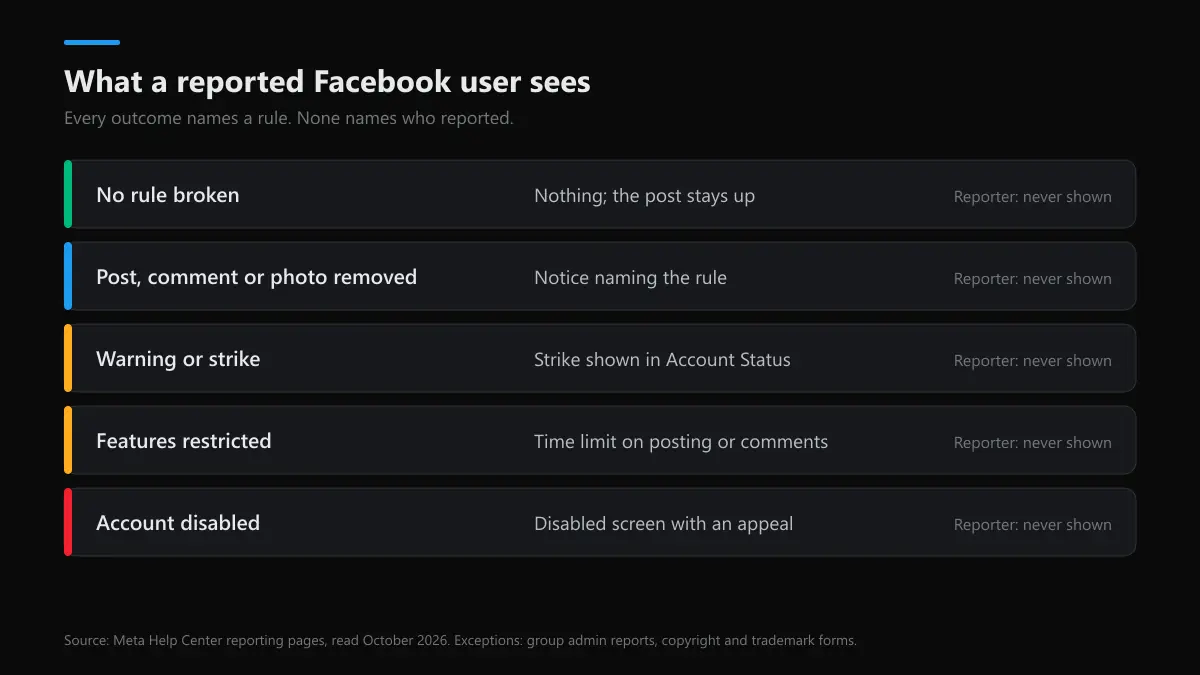
Admins and moderators are listed on the group's Members tab. File on an admin's profile for what that person did, such as running a scam, harassing members or impersonating someone, and file on the group for what it hosts. The two reports reinforce each other. According to the strike page, a strike for content posted to a group someone manages "may also count against that Page or group". Violations an admin approves can count against the group as well. An admin who posts or approves rule-breaking content is therefore the fastest legitimate route to the group itself. This is also how to report a Facebook group anonymously without guessing: a report on the admin's profile or the group goes to Facebook, and the admin is told about a decision and the rule behind it, not who reported. Copyright and trademark claims are the exception, because those notices can pass the rights holder's details on.
When the same admin also posts the scam from an X account, Twitter Ban Service can check that account against the X Rules. The Facebook side stays with Meta.
How to get a Facebook group shut down, and why report counts don't do it
A group is shut down when Meta finds repeated Community Standards violations, or a single severe one; the number of reports is not the trigger. Facebook's reporting help page says it in one line: "The number of times something is reported doesn't determine whether or not it's removed." That is the honest answer to how many reports to delete a Facebook group. One accurate report starts a review, and a hundred inaccurate ones do not add up to a violation. Strikes also expire, since Meta's strike page says all strikes on Facebook "expire after one year", so a group that broke a rule once two years ago is in the clear.
So how to get a Facebook group deleted in practice: document the pattern, not the volume. Five dated posts that break the same rule, links to the admins who approved them, and a name or cover that breaks the standards on its face give a reviewer what Meta's removal rule actually asks for.
The same logic answers how to get a Facebook group banned for scam activity. Report the group with the scam reason, report each scam post, and report the admin profiles collecting payments; our guide on reporting a Facebook scammer by scam type covers the individual reports, and money already sent is a matter for your bank first.
Anyone searching how to get a Facebook group shut down reddit style, by rallying friends to report at once, is working against Meta's own rule. Coordinated false reports can count against the people sending them, as our page on why mass reporting Facebook groups backfires explains.
What we decline
Any case aimed at a group or account that follows the rules is one Twitter Ban Service turns down: a rival business, a critics' group, a fan page you dislike. The service does not run report rings or bots, never asks for passwords or 2FA codes, and offers no guarantee of a suspension. Child sexual abuse material goes to the NCMEC CyberTipline or your national hotline and the police, not to a reporting service.
When the group's members move to X and Instagram
Groups that run scams or harassment rarely stay on one platform, and the same people often post the same material from X and Instagram accounts. On Instagram, start with how to report a scammer on Instagram, and if a whole profile is the problem, read what it takes to remove someone else's Instagram or X account. For single uploads, there is a guide to removing an Instagram account, post or reel, and if you flagged the wrong thing, see whether an Instagram report can be withdrawn.
On X, Twitter Ban Service handles the case this way. You send the X account links and your screenshots. Each post is read against the X Rules and matched to the rule it breaks, or the case is declined if it breaks none. Genuine violations are filed through X's official report forms, and X makes the final decision; no outside service can see or steer that review.
Some knock-on problems come up around these cases. When a group copies your brand, it sometimes takes a matching handle on X and leaves it idle; see why an X username shows as unavailable, claiming an inactive Twitter username and whether X deletes inactive accounts. If you deactivated during a pile-on, reactivating your X account explains the window. For contact routes, compare X customer service options with the Twitter helpline question, and for the reporter's side on Facebook, read whether a Facebook report is anonymous.
FAQ
How many reports does it take to delete a Facebook group?
There is no number when you ask how many reports to delete a Facebook group. Meta's reporting help states that "the number of times something is reported doesn't determine whether or not it's removed", so a group with one accurate report can come down and a group with thousands of inaccurate ones can stay. What decides it is the review: Meta removes groups that repeatedly violate the Community Standards, and its Transparency Center lists the triggers as a violating name, description or cover photo, admins or moderators posting violating content, and admins or moderators approving violating member posts. One severe violation can disable a group outright. So how to get a Facebook group deleted is a question of evidence, not headcount: dated post links, screenshots, the admins involved, and the rule each post breaks. If you searched how to get a Facebook group shut down reddit and found the advice to organise many people to report at once, it adds no weight and can look like coordinated false reporting.
Can I report a Facebook group anonymously?
Yes, if you report it to Facebook. Knowing how to report a Facebook group anonymously mostly means picking the right option. A report sent through Report group, or through a post's menu with Facebook as the recipient, does not tell the admins or members who filed it; if Meta acts, they see the decision and the rule involved, not your name. Two routes are different. Reporting a post to the group's admins goes only to those admins, and they can see who sent it, so avoid it when the admins are the problem. Copyright and trademark claims are not anonymous either, because the notice can include the rights holder's contact details. Keep your screenshots private as well: a screenshot shared back into the group can identify you faster than any report. If you are worried about retaliation, block the admins after you file, not before, so the Report link stays visible.
How do I report a Facebook group that blocked me or banned me?
Whether you need how to report a Facebook group that blocked you or how to report a Facebook group that banned you, your own account usually can't do it, because a ban or block hides the group and its Report link. Facebook's reporting page sends blocked users to a separate help article. In practice, how to report a Facebook group if you are blocked, or how to report a group on Facebook if you are blocked by one admin, comes down to two things. First, the evidence you saved before losing access, including the group address, dated screenshots and post links. Second, a friend who can still see the group and reports it using those exact links. Don't make a second account to get back in; Meta's account integrity rules target accounts created to evade restrictions or to contact someone who blocked you. If the group is threatening you or posting your private details, report those posts specifically and contact the police about threats.
How do I report a Facebook group that has no admin?
How to report a Facebook group that has no admin is the same as for any group: open it, use the three-dot menu in the header and choose Report group, then flag the worst posts one by one. An adminless group is not exempt from the Community Standards. Meta's help text, as reported in August 2023, says that if a group has no admins, Facebook may suggest some members become admins, and may archive the group if it stays without admins for a while. Archiving is not removal, so a report still matters if the group holds scam or abusive posts. With nobody approving posts, these groups often fill with spam links. Knowing how to report a Facebook group with no admin mostly means choosing the closest reason for each item, since a reviewer judges content against the standards rather than the group's activity level. If you are a member and are offered the admin role, you can clean the group up yourself instead.
How do I report a Facebook group admin?
Find the admin under the group's Members tab, open their profile, and report the profile for what that person did: a scam, harassment, impersonation or hate. Then report the group for what it hosts. Doing both matters because Meta's strike rules connect them. Its Transparency Center says a strike for content posted to a group someone manages may also count against that group, and violations an admin approves may count as strikes against the group. When people ask how to report a Facebook group admin, they often mean an admin who deletes their posts or removes them unfairly. That is a moderation choice, not a rule violation, and Meta does not review it. To report a Facebook group admin successfully, point to content they created or approved that breaks a named Community Standard. The admin is told about any decision, not who reported, unless the claim is a copyright or trademark notice.
How do I get a Facebook group banned for scam posts?
How to get a Facebook group banned for scam posts: file on the group with the scam or fraud reason, flag each scam post individually, and report the admin profiles that collect payments or push people to private chats. Meta removes groups that repeatedly break its Community Standards, and an admin who posts or approves scam content creates strikes that may count against the group. That makes the admin's own activity the strongest part of the evidence. Save the group address, screenshots of the offer, payment instructions and any usernames used off Facebook before you report, because posts disappear once Meta acts. If you lost money, call your bank or card issuer the same day; Meta can remove the group but cannot return funds. Twitter Ban Service can help only if the same scammers run accounts on X: send those links, they are checked against the X Rules, and genuine violations are filed through X's official channels while X decides the outcome.
Can I report a Facebook group I am not a member of?
Usually, yes. How to report a Facebook group that you are not a member of starts with finding it: if the group shows up in search or through a link, its page normally offers the same Report group option to outsiders. What you can report depends on the privacy setting. In a public group every post is visible, so you can report the group and individual posts. In a private group, outsiders generally see only the name, cover photo and description, which can still break the rules on their own; Meta lists a violating name, description or cover photo as grounds to remove a group. Hidden groups stay out of search. For abuse inside a private or hidden group, how to report a Facebook group you are not in comes down to a member who can see the posts and reports them to Facebook with the post links. Never join under a fake profile to collect evidence, because the fake account breaks Meta's rules too.